Romantic wedding website with RSVP form
Macaly’s AI agent created a beautifully elegant wedding website from only a few prompts — featuring a romantic hero section with the happy couple, the day’s itinerary, venue details, dress code, an “Our Story” section, and an RSVP form that automatically records every submission. In just five prompts, a simple concept was transformed into a stunning digital wedding invitation.
Try Macaly AI
Overall Stats
 14 minutes
 5 prompts
Author
Macaly AI Macaly AI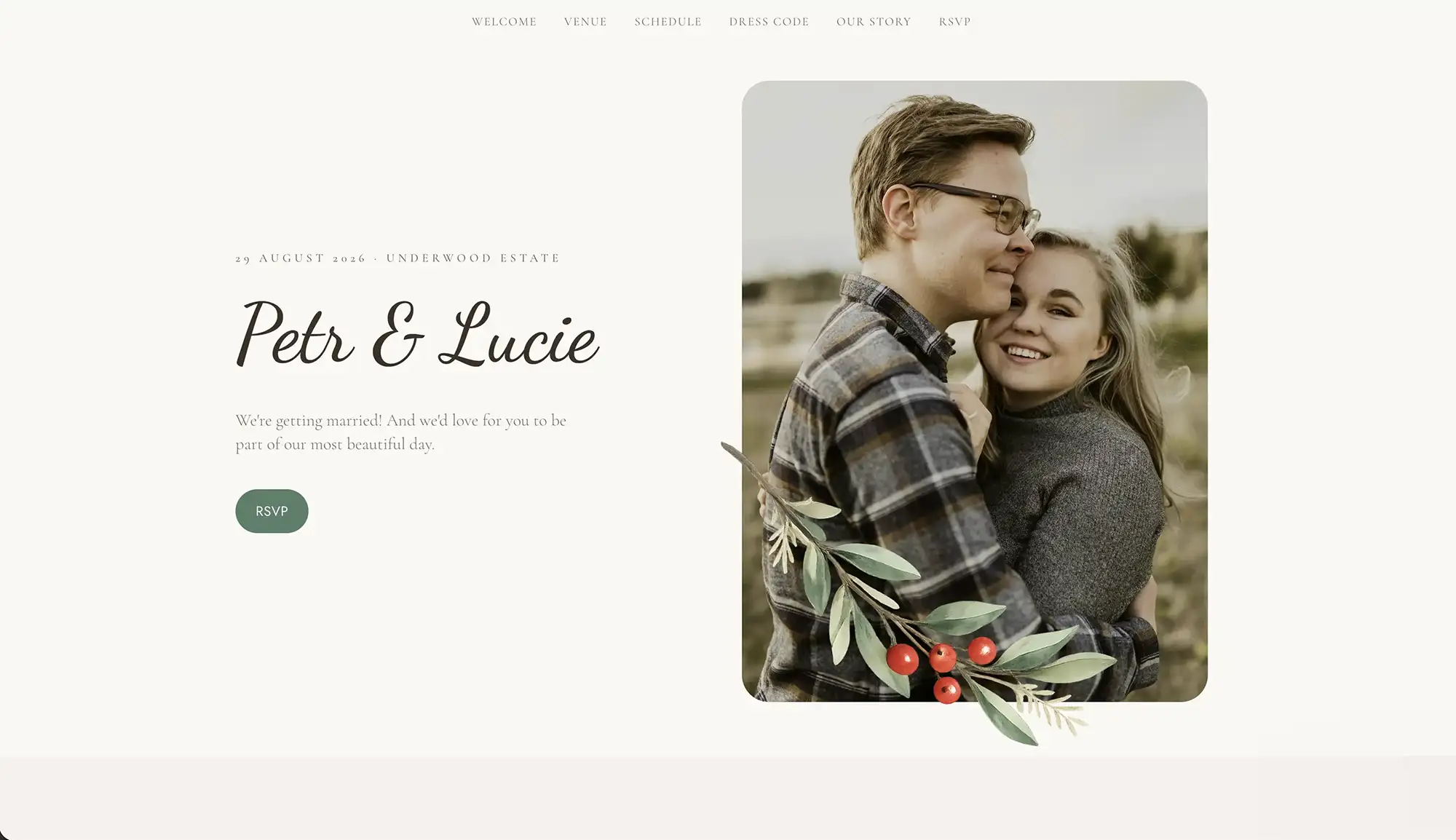
1. Describe the website and generate it in seconds
A single prompt produced the complete website, including a romantic hero section with the couple’s names and photograph, alongside dedicated sections for the schedule, venue, dress code, their story, and an RSVP form. The finished design combines a soft cream colour palette with elegant script typography to create a timeless, sophisticated feel.
“Build a romantic wedding website for Petr & Lucie, 29 August 2026 at Underwood Estate. Hero with our photo and names, plus schedule, venue, dress code, our story and an RSVP. Soft cream palette with an elegant script font.”
2. Build the RSVP form
An inviting RSVP form lets guests enter their name, confirm whether they’ll be attending, specify the number of guests, select their preferred meal, and include a personal message. Built-in validation helps reduce errors, before displaying a warm thank-you message once the form has been submitted.
“Add an RSVP form: name, attending or not, number of guests, meal choice and a message. Show a warm thank-you when they submit.”
3. Save every RSVP automatically
Every RSVP is saved automatically to a database, creating a private guest list that neatly organises attendance, meal selections, and personal messages in one central location that’s easy to manage.
“Save every RSVP in a database with a guest list showing attendance, meal choices and guest messages.”
4. Send confirmation emails
When guests submit their RSVP, they automatically receive a confirmation email containing the wedding date and venue information. At the same time, the couple receives an instant notification each time a new response arrives.
“Email each guest a confirmation with the date and venue, and notify us for every RSVP.”
5. Apply the finishing touches
Delicate botanical details, an elegantly framed hero image, subtle scrolling animations, and a fully responsive layout give the website a refined finish, while ensuring the RSVP button remains prominent and easy to tap on mobile devices.
“Add botanical accents and soft animations, and keep the RSVP button easy to reach on mobile.”
What the AGENT BUILT
An RSVP form that’s quick and easy to complete
Guests can effortlessly enter their name, attendance status, guest numbers, meal preference, and a personal message. Helpful validation keeps submissions accurate, followed by a friendly confirmation once everything has been sent.
A private guest dashboard
Every RSVP is stored securely, giving the couple a live overview of attendance, guest numbers, meal preferences, and personal messages from one convenient dashboard.
Automatic email notifications
Guests receive an email confirming their RSVP together with the key wedding details, while the couple is alerted immediately whenever a new response is submitted.
A timeless romantic design
Soft cream colours, elegant script typography, botanical flourishes, and a beautifully presented hero image of the couple combine to create a warm, personal website that feels bespoke rather than off-the-shelf.
All the key information in one place
The wedding itinerary, venue details, dress code, and “Our Story” section are all presented on a single page, making it simple for guests to find everything they need ahead of the big day.
Designed for mobile
As many guests are likely to RSVP from their phone, the RSVP button remains clearly visible and easy to access with a single tap.
Build yours IN MINUTES
Describe what you want and Macaly builds it. No coding, no waiting, no developers.
Join the free trial