A sales CRM your small team will genuinely use
Created in just 19 minutes with five prompts. Follow the same step-by-step approach to build it yourself, then adapt every part in seconds with Macaly.
Try Macaly AI
Overall Stats
 19 minutes
 5 prompts
Author
Macaly AI Macaly AI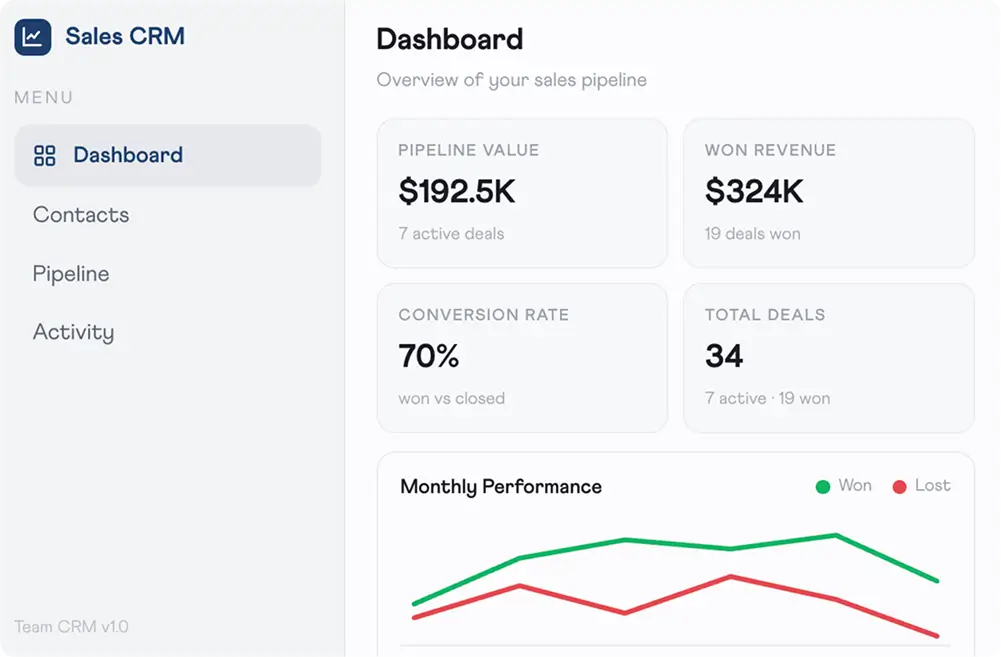
1. Describe your CRM and generate a working app
One prompt produced the complete application — including a dashboard displaying pipeline value, revenue won, conversion rate and total deals, plus a monthly performance chart and dedicated sections for contacts, pipeline and activity. The finished app featured a clean, light design with subtle navy highlights.
“Build me a simple sales CRM for a small team. Dashboard with pipeline value, won revenue, conversion rate and total deals, a monthly performance chart, and pages for contacts, pipeline and activity. Keep it clean and light - no clutter.”
2. Save every deal automatically
Contacts, opportunities and notes were connected to a live database, so every update was saved instantly and remained available after refreshing the app. Every stage change in the pipeline was also logged automatically with a timestamp.
“Store contacts and deals in a database. When I move a deal through the pipeline, save the stage change with a timestamp.”
3. Add reporting for wins and losses
A further prompt introduced a monthly performance chart comparing won and lost deals over the previous six months, complete with clear labelling and graceful handling whenever there was no data to display.
“Add a monthly performance chart that compares won and lost deals over the last six months.”
4. Invite your team
Authentication was added with role-based permissions. Administrators could access every deal, while sales reps only saw opportunities assigned to them. User sessions were handled automatically, with no extra setup required.
“Add login for my team. Admins see all deals, sales reps only their own.”
5. Polish the experience
The final prompts refined the application by standardising the metric cards, introducing keyboard shortcuts for pipeline management, and generating 14 automated tests covering the entire app. The result: zero errors.
“Tidy the dashboard spacing and make the metric cards consistent.”
What the AGENT BUILT
Live pipeline insights
Pipeline value, revenue won, conversion rate and total deal figures refresh automatically as opportunities progress through each stage of the sales pipeline.
Win/loss reporting
Track sales performance across the previous six months with a monthly chart comparing won and lost deals, powered by live CRM data rather than manually updated spreadsheets.
Role-based access
Administrators can view every deal across the business, while sales reps only have visibility of the opportunities assigned to them. Everything is configured from a single prompt, without the need for a separate admin panel.
Complete activity history
Calls, notes and pipeline changes are automatically recorded against every contact, giving the whole team a clear history whenever they need it.
Clean, focused interface
A bright, uncluttered layout, subtle navy accents, four key metric cards and a single performance chart keep the focus on the information that matters most.
14 tests. Zero errors.
Deal workflows, user permissions and interface rendering were all tested before handover, resulting in a reliable, production-ready application.
Build yours IN MINUTES
Describe what you want and Macaly builds it. No coding, no waiting, no developers.
Join the free trial